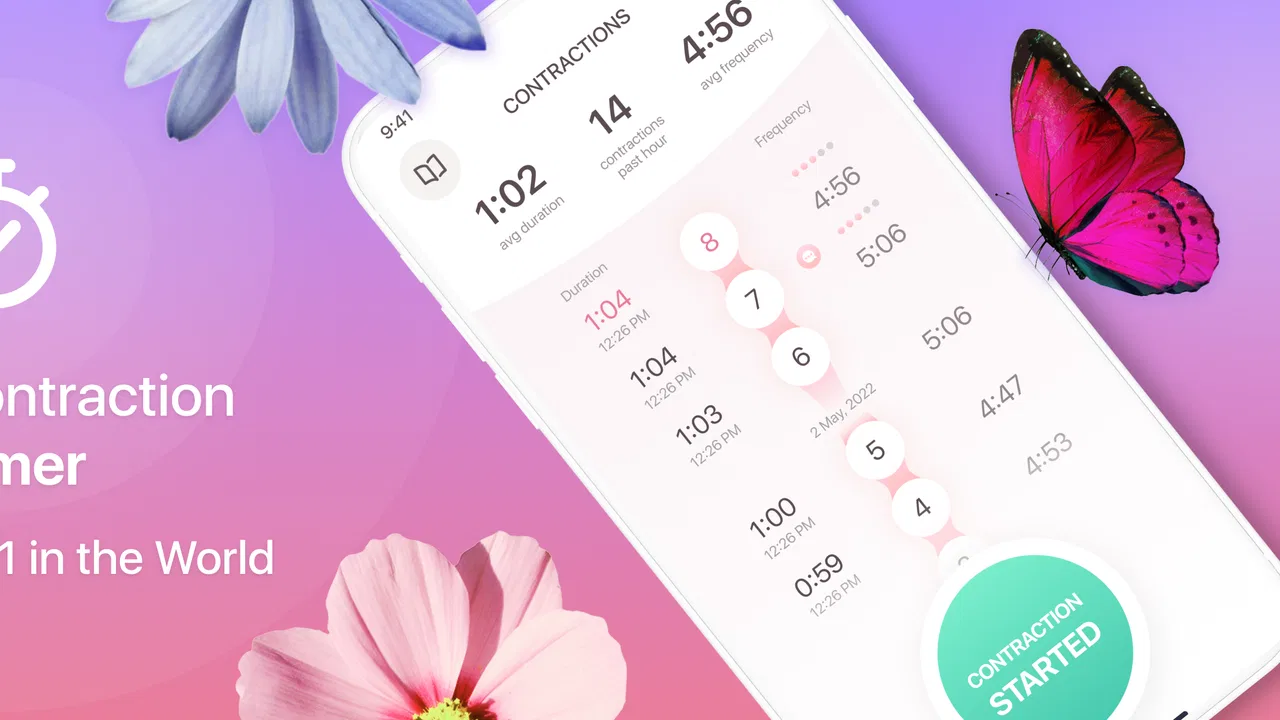
Contraction Timer & Counter 9m
- 4.8
- Rating
- 5.00M
- Installs
- Free
- Price

 Analysis by App-foxy
When labor begins, the hardest part is often not starting a timer; it is remembering what happened a few minutes ago while trying to stay calm. Contraction Timer & Counter 9m is built around one focused job: recording labor contractions so I can see their timing instead of relying on memory. That narrow purpose is its biggest strength. It does not try to become a general pregnancy planner or a broad family organizer. It gives attention to the rhythm of contractions, which is exactly the information many people want to collect during early labor.
I see this free parenting app as a practical companion for a specific moment rather than something I would use every day throughout pregnancy. Its developer is Neiman, and the app has earned a 4.8 average from around 84 thousand ratings, with more than 5 million installs. Those figures suggest that the simple idea has connected with a large audience, but popularity alone is not the reason I would recommend it. The real value is that a dedicated contraction log can reduce mental effort when the person using it is tired, uncomfortable, or trying to communicate with a partner or maternity team.
Why the contraction-timing capability matters
The central capability sounds modest, yet it changes the way I would handle the early stages of labor. Instead of saying, “They seem closer together now,” I can tap when a contraction starts and again when it ends, then use the recorded pattern as a clearer reference. That distinction matters because two details are easy to confuse: how long an individual contraction lasts and how much time passes before the next one begins.
You May Also Like

 Blood Strike: 2.5 Anniversary
Blood Strike’s Loadouts Turn Every Drop Into a Tactical Gamble
A close look at Blood Strike’s custom loadouts: how fast access to signature weapons reshapes its battle royale rhythm, rewards preparation, and narrows the gap between fights.

 Pandora - Music & Podcasts
Pandora’s Music Is Easy to Start, but Harder to Recover
Pandora’s strength is its low-effort path from a seed to a station. Its weak spot is how much confidence it asks you to place in connection, setup, and quiet recovery.

 8 Ball Pool
 Is Built on Rivalries, Rematches, and Routine
A close look at the rivalries, rematches, shared routines, and unanswered safety questions that turn a quick pool match into a persistent mobile community.

 Samsung Music
’s Quiet Strength Is Playing What You Already Own
Its reach comes less from spectacle than from dependable access to a personal library. That simplicity is both the app’s strongest retention engine and its ceiling.

 AccuWeather: Weather Radar
AccuWeather Review: A Quick, Clear Forecast for Everyday Decisions
For everyday plans, the best forecast is the one you can understand quickly. AccuWeather makes rain timing, radar, and local conditions easy to act on, with a few trade-offs.

 Hill Climb Racing
Why Hill Climb Racing Still Turns Crashes Into One More Run
A tiny car, a bumpy hill and one more upgrade: Hill Climb Racing keeps resurfacing because its simple chaos makes every near-miss feel personal.
More From Our News Desk
View All News


A notebook can record the same information, and a normal stopwatch can measure a single event. The advantage here is having a tool designed for repeated contractions. I do not need to create a new note for every event or calculate intervals in my head. The app’s purpose keeps the attention on the sequence, which is more useful than a collection of disconnected stopwatch results.
In my view, the most important benefit is not precision for its own sake. It is the reduction of decision fatigue. During labor, even simple arithmetic can feel irritating. A purpose-built contraction timer lets me concentrate on breathing, resting between contractions, and telling my support person what is happening. The record can also make a conversation with a healthcare professional more concrete, although I would never treat an app’s timing pattern as a medical diagnosis or as a replacement for professional advice.
The app is also useful because labor does not always progress in a neat, predictable line. A few contractions may feel close together, followed by a longer pause. If I only remember the strongest moments, I may form an inaccurate impression of the overall pattern. A running record gives me something more dependable to look back at, especially when the night has become tiring and the events start blending together.
The difference between timing and interpreting
One subtle point is that recording contractions and deciding what they mean are separate tasks. The app can help me collect timing information, but it cannot know how labor feels, whether there are other symptoms, or what guidance my healthcare provider has already given me. I would use it as an observation tool, not as an authority.
That distinction is important for first-time parents. It is tempting to look for a pattern and assume that the pattern alone answers the question of when to call or travel. In practice, personal medical instructions, location, previous birth experience, and other symptoms can all affect that decision. The responsible workflow is to use the timer to organize information, then follow the advice provided by a qualified professional.
This is also why I appreciate the app’s narrow focus. A more ambitious pregnancy application might offer articles, checklists, appointment reminders, and development tracking, but those extras can make it harder to reach the one tool needed in the moment. Here, the concept is easier to understand: open the app, record the event, and review the timing. For someone who already has a separate pregnancy app, that focused role can be a benefit rather than a weakness.
How I would use it during a real labor routine
I would prepare the app before contractions become intense. That means opening it while I am still comfortable, checking that it runs properly on my phone, and making sure the device has enough battery for the period when it may be needed. This small preparation step is more valuable than trying to learn any app while dealing with a strong contraction.
When a contraction begins, I would start the timer as soon as I can do so without creating stress. When it eases, I would stop it. The important habit is consistency: use roughly the same approach each time rather than starting at one moment and stopping at another based on changing personal definitions. If a contraction builds gradually, I would choose a practical point and keep that approach for the next entries.
After several entries, I would review the sequence rather than focusing on one unusually short or long event. A single contraction can be misleading. The useful picture comes from repeated observations over time. This is one of the app’s less obvious strengths: it encourages me to think in terms of a pattern instead of reacting to every individual number.
A partner can take over the tapping if the person in labor no longer wants to handle the phone. That creates a simple division of responsibilities. One person can focus on comfort and communication while the other keeps the record. I would agree beforehand on what “start” and “finish” mean, because two people using different timing habits can produce a confusing log even when both are acting carefully.
Another practical tip is to keep the phone accessible without making it the center of the room. I would place it somewhere easy to reach, with the screen visible enough for the support person, but I would avoid repeatedly checking it between contractions. The app is most helpful when it supports the experience rather than turning labor into a constant monitoring exercise.
If I needed to share the pattern, I would describe the recent timing in plain language and mention how the contractions feel alongside it. The record is more useful when combined with context. For example, saying that contractions have been occurring with a similar rhythm and are becoming harder to manage tells a healthcare professional more than quoting one isolated duration.
A realistic overnight example
Imagine waking during the night with contractions that are uncomfortable but still manageable. At first, I might be tempted to stay in bed and estimate the intervals. After a few events, however, memory becomes unreliable: was the previous one seven minutes ago or closer to ten, and did it last half a minute or longer? I would open the app, record each contraction, and let the phone handle the running sequence while I return to resting between events.
My partner could watch the timing while I focus on breathing and changing position. After a while, we could look at the recent entries and call the maternity unit with a clearer account. If the pattern changes, the record helps us notice that change without relying on tired guesses. If things settle down, the same information can reassure us that the rhythm has not simply been imagined.
This scenario shows why the app is more useful than a generic stopwatch. A stopwatch measures one event well, but labor involves repetition. The dedicated design turns repeated starts and stops into a single activity, so I do not have to rebuild the history manually after every contraction.
Where the focused design has limits
The same simplicity that makes the app approachable can make it feel limited to users who want a complete pregnancy toolkit. Someone looking for feeding logs, appointment planning, educational material, or broader family organization would probably be better served by another app or by several tools chosen for those separate needs. I would not install this expecting it to manage the whole pregnancy journey.
It is also not the right choice for someone who dislikes entering information during labor. Even a simple timer requires a tap at the beginning and another at the end. If the phone is out of reach, the person is moving around, or the contraction arrives suddenly, an entry may be missed. A paper note, a partner’s help, or a voice-based method may be more practical in that moment. The best tool is the one that can actually be used comfortably.
There is a human limitation too: timing can become a source of anxiety. Watching every interval may encourage constant checking, especially when the pattern is irregular. I would use the app in short review periods rather than staring at it continuously. If tracking starts to increase worry, I would put the phone down and follow the care plan from my healthcare provider.
The app is free to download, with in-app purchases priced at $0.99 per item. That makes trying the basic experience low-risk, but I would still pay attention to any optional purchase screen before confirming anything. A person who wants a completely minimal tool may prefer not to explore extras at all. The free entry point is convenient, while the presence of optional purchases means the experience may not be identical for every user.
Compatibility is another practical consideration. The current version is 2.1 and requires Android 6.0 or later. That covers many older devices, but not every phone still in use. I would check compatibility before relying on it for an important event, especially if the phone belongs to a partner or is an older backup device.
The Everyone content rating makes the app broadly suitable from an age-classification perspective, but that should not be confused with medical suitability for every situation. The rating describes the app’s general content, not the personal advice a pregnant person may need. The app can organize timing; it cannot assess an emergency.
How it compares with ordinary alternatives
A notes app gives more flexibility. I could write down start times, end times, symptoms, and questions for a nurse in one place. That is useful if I want a broader journal, but it also leaves me responsible for calculations and consistent formatting. For quick repeated timing, the dedicated approach is less mentally demanding.
A stopwatch is even more immediate, but it usually treats each contraction as a separate measurement. I would need another method to compare entries. That option may be preferable for someone who wants no learning curve and does not care about keeping a longer sequence, but it loses the main advantage of a specialized contraction log.
A full pregnancy suite may offer more surrounding information and planning tools. Its trade-off is clutter. If I only need labor timing, opening a large app and navigating through unrelated sections can be frustrating. I would choose a broader app when I want an all-in-one pregnancy record, and this one when the immediate requirement is simply to track contractions with as little distraction as possible.
Who gets the most value from it
I think this app suits expectant parents who want a dedicated tool ready for early labor, particularly those who would otherwise rely on memory or handwritten notes. It is also a good fit for a support person who wants to take responsibility for timing without building a spreadsheet or learning a complicated system.
It can be especially useful for people who prefer straightforward interfaces and do not want a stream of unrelated pregnancy content. The narrow purpose makes it easy to explain to a partner: start the event, stop the event, and review the developing pattern. That clarity can matter when both people are tired.
Parents who already have a detailed pregnancy application may still find a place for it as a specialized companion. I would not judge the two tools as competitors in every respect. The broader app may handle planning and education, while this one handles the repeated timing task. Keeping those roles separate can actually make the urgent tool easier to use.
I would skip it if I wanted extensive medical guidance, a complete pregnancy diary, or a tool that can make decisions for me. I would also skip it if tapping a phone during contractions sounds distracting or uncomfortable. In those cases, a partner with a simple written record or a different accessibility-friendly option may be a better match.
Before labor, I would decide who will operate the app, where the phone will be kept, and which instructions from the healthcare provider should take priority. That preparation turns the app from something I merely installed into part of a sensible plan. I would also test it on the intended device rather than assuming it will be convenient when needed.
My final view after focusing on its real job
Contraction Timer & Counter 9m succeeds because it does not need to solve every parenting problem. Its useful capability is focused recording of labor contractions, and that can replace vague estimates with a clearer sequence at a time when attention is limited. I value it most as a low-effort organizer for the conversation between the person in labor, their support person, and their healthcare provider.
It is not a medical guide, a substitute for professional care, or a complete pregnancy management system. Its manual tapping, optional in-app purchases, and narrow scope are genuine trade-offs. Still, for someone who wants a dedicated contraction log and has a compatible phone, the free starting point makes it easy to prepare without committing to a larger suite.
My recommendation is simple: install it before labor, practice the basic start-and-stop routine, and treat its record as helpful context rather than a verdict. The strongest reason to choose it is reduced mental load when repeated timing matters. If that is the exact problem I am trying to solve, Neiman’s app is a sensible, focused choice.
FAQs for Contraction Timer & Counter 9m
01What is the primary purpose of the Contraction Timer & Counter 9m app?
The Contraction Timer & Counter 9m app is designed to help expectant mothers track and monitor their contractions during labor. The app provides an easy-to-use interface to log the start and end times of contractions, calculate their frequency and duration, and identify patterns that can help determine when it's time to head to the hospital.
02Is the Contraction Timer & Counter 9m app easy to use for first-time parents?
Yes, the Contraction Timer & Counter 9m app is designed with simplicity in mind, making it ideal for first-time parents. Its intuitive interface allows users to easily start and stop the timer with a single tap, and it provides clear visual and textual feedback on contraction patterns, ensuring users can quickly and effectively monitor their progress.
03Does the Contraction Timer & Counter 9m app offer any additional features beyond timing contractions?
In addition to tracking contractions, the Contraction Timer & Counter 9m app often includes features like reminders for hospital visits, tips for labor preparation, and the ability to share contraction data with healthcare providers. These additional tools aim to enhance the overall user experience and provide comprehensive support during labor.
04Is the Contraction Timer & Counter 9m app available for both Android and iOS devices?
Yes, the Contraction Timer & Counter 9m app is typically available for both Android and iOS platforms. This ensures that a wide range of users can benefit from its features regardless of their preferred device. It's advisable to check the app store on your device for availability and compatibility with your specific operating system version.
05Are there any costs associated with using the Contraction Timer & Counter 9m app?
The Contraction Timer & Counter 9m app is often available as a free download, with optional in-app purchases available for premium features or ad-free experiences. Users can benefit from the core functionality at no cost, while those interested in enhanced features can explore paid options based on their needs.
Pros
- Simple and intuitive interface.
- Accurate contraction tracking.
- Customizable alerts and reminders.
- Supports multiple language options.
- No ads interrupt the experience.
Cons
- Limited features in free version.
- No integration with health apps.
- Lacks offline data backup.
- Requires frequent updates.
- User interface needs modernizing.

Contraction Timer & Counter 9m
Gallery